Copy the whole page for your agent
Paste it into Claude Code or Codex and ask it to set this up for you.
When Opus 5.5 dropped, everyone was talking about video editing. I immediately wanted to give it a shot. Video has been something I enjoy creating but have always been limited by my ability to afford good video editors and even when I spent the money, the time it took to create something I loved felt draining (often 2-3 weeks minimum).
I had filmed a video with a friend, William Fitzpatrick, earlier this year and he said that his editor had refused the job because it was too complicated and there were too many things to fix.
“Send me the files, I’m going to see what Claude can do.”
I was blown away with the results and the video ended up being a hit on YouTube as well.
Through working on that video, and subsequent ones, I’ve been learning a ton and am more excited about video than I ahve been in hears.
Some of the high level tips:
- Use Opus 5.5 ASAP. It was the first model that really made this possible. I'm now also using Fable 5.2, and have introduced sub-agents, typically Sonnet or Haiku, as quicker and cheaper review agents.
- Literally attempt something with a single prompt first, to get a feel for how it works.
- Then film something on your own and ask it to turn it into a nice clip or YouTube video. Ask it what it needs from you to do great work.
- You can also have it create a video first, with content and styling and motion graphics and THEN record the video to fill in the spots.
- You can use mostly free libraries. Use the free and open source tool HyperFrames, as well as Whisper models locally for transcription. And simply ask about other open libraries, including ones for motion graphics (hyperframes is rapidly adding all of these things).
- Build your own review dash. Tell it to create a dash where you can give feedback aligned with timestamps and tag stuff that needs review.
- Find reels or videos you like, ask it to watch and screen-capture them, and start building your preferences.
- Ask it to scan your local folders for b-roll, and have it organize and label the b-roll. Or even open google photos in your agent browser and have it download ones it things are good.
- Ask where you can get free b-roll. Pixabay is a good place to start. Wikimedia Commons as well.
- Prompt away with the dash in your browser.
- Tell it to auto-update every time you fix something, to develop a skill around your preferences.
Six weeks later I’ve made about 40 reels this way for The Pathless Path and StrategyU.
Build your own review dash
One of the best things about the latest versions of claude code and Coeex is that you can open a browser within the app and then use claude with it. For this reason, for almost everything I’m doing, I build locally run dashboards that I can customize to my work. I keep it open in the browser inside the Claude app while we work, so I can leave a note on a video and Claude can read it and fix it without me leaving the chat.
When I first tell people about this, they say, “Well, why not use something like Descript, which is designed to do this kind of editing.” For me, it’s mostly about pricing in the fact that these models are just going to get better, and the returns to actually designing software around how I want to work are incredibly high because it means I enjoy the work more and want to keep going on a path I want to stay on. Plus I saved the monthly subscription fees :-)
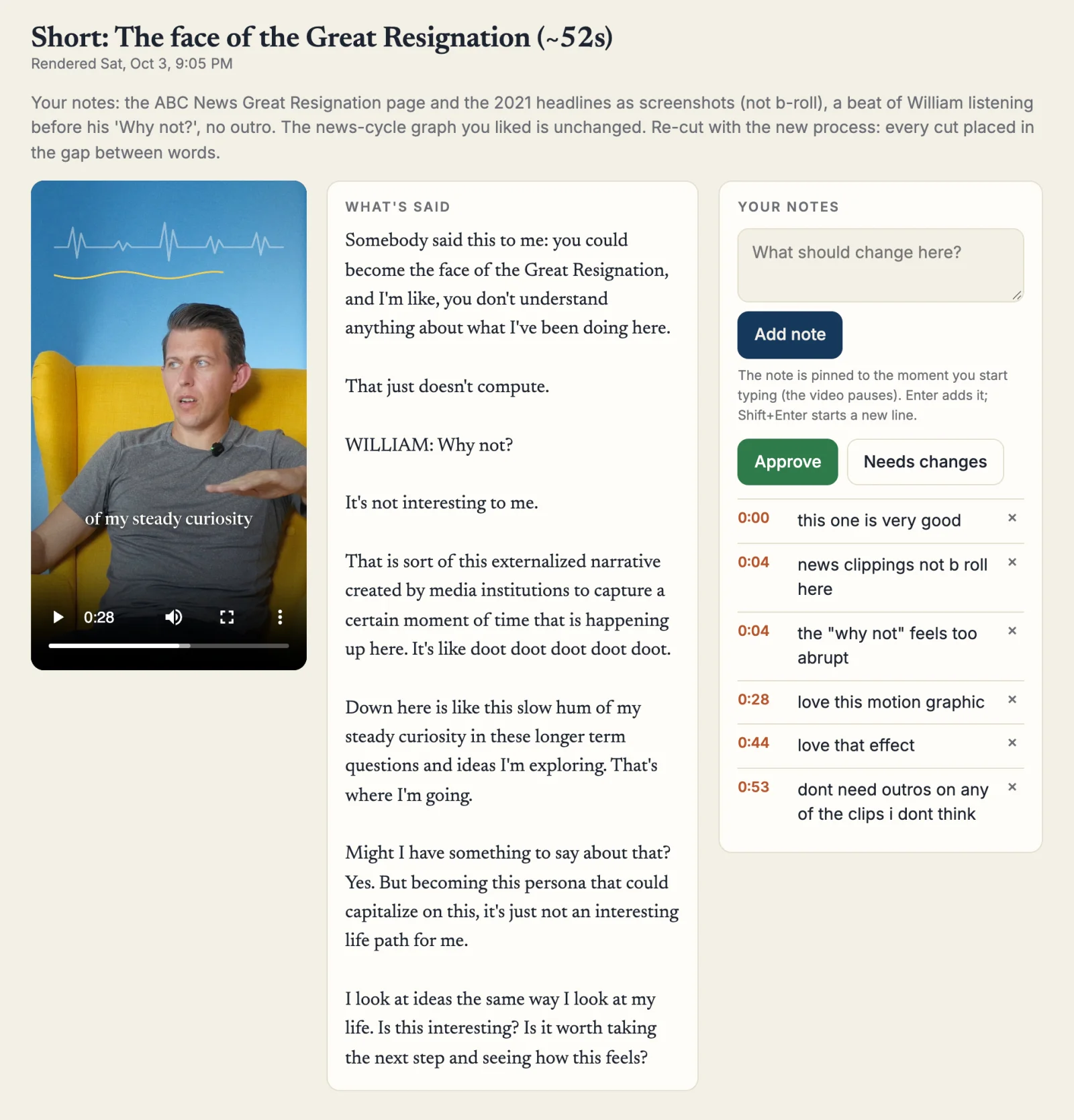
Use this prompt to create your own dash
Build me a review dashboard for the videos we make together, and use it every time from now on.
Where it runs
- Host it locally, on my computer only, as a small server on one fixed address like http://localhost:8787. It shouldn't need an account, a login, or anything in the cloud.
- Keep it running. Set it up to start when I log in and to restart itself if it stops (on a Mac, use a launch agent). Tell me the address once and don't change it.
- It has to work in the browser built into Claude Code or Codex, right next to our chat, and in a normal browser too. That means a real web page over http, not a file I open from a folder, and it should read well in a narrow pane and in a wide window.
- Serve the video files so I can jump to any second without waiting for the whole file to load.
What's on the page
- List every video down the left with its title, its length, when it was rendered, and whether it's approved, needs changes, or hasn't been reviewed. Mark the ones that are new since I last looked.
- When I pick one, show the video, what's said in it, and my notes side by side in one row when the window is wide enough.
- Above the video, give me one line on what changed in this version.
- Give me a notes box. When I start typing, pause the video and pin the note to that second. Enter adds the note. Each note shows its time, clicking the time jumps the video there, and I can delete a note.
- Give me two buttons, Approve and Needs changes.
- Save my notes and approvals to a file on disk as I go, so nothing is lost when I close the tab and you can read them any time. Show me when it has saved.
- If a new render arrives while I'm watching, don't swap the video under me. Offer the new one instead.
How you use it
- When you finish a render, add it to the page with a line on what changed. Open the page in your own browser and check that it loads and the video plays before you tell me it's there.
- When I say I've left notes, read the notes file, fix every note, render again, and put the new version back up.
- A video isn't done until I approve it on that page. Never post or publish anything I haven't approved there.
- Every time I give a note, write it into a rules file with the date, and read that file before you start the next video. When a note is about a mistake, add a check that catches it so I don't see the same mistake twice.
Before you build it, ask me what you need to know.
Now that creation is easier, I spend more time editing. Nothing posts until I approve it in Pathless HQ
I also ended up building a second dashboard for the review, editing, and posting of the content and I still invest a lot of energy in this step, however, since writing and editing and reacting to things is easier for me, it means that its actually much easier to create stuff.
Here’s the general flow of the review sequence. When they go into the review dash, it automatically schedules them in an open slot and creates captions, link triggers, and the right format for each platform.
While I’ve vibe coded a lot of software, I’m still using post-bridge for agentic scheduling of all my posts across platform. Why? Mostly its just a lot of connectors that tend to change, its run by an awesome guy - Jack Friks - and the price isn’t too bad (reasonable monthly fee plus $50 for agentic mode). You can check them out via my referral link.
- Ideas I pick what's worth making.
- Being made Claude builds it.
- To review I approve it or send it back with a note.
- Ready Captions are written and it has a day.
- Scheduled and posted It goes out at 9am New York time.
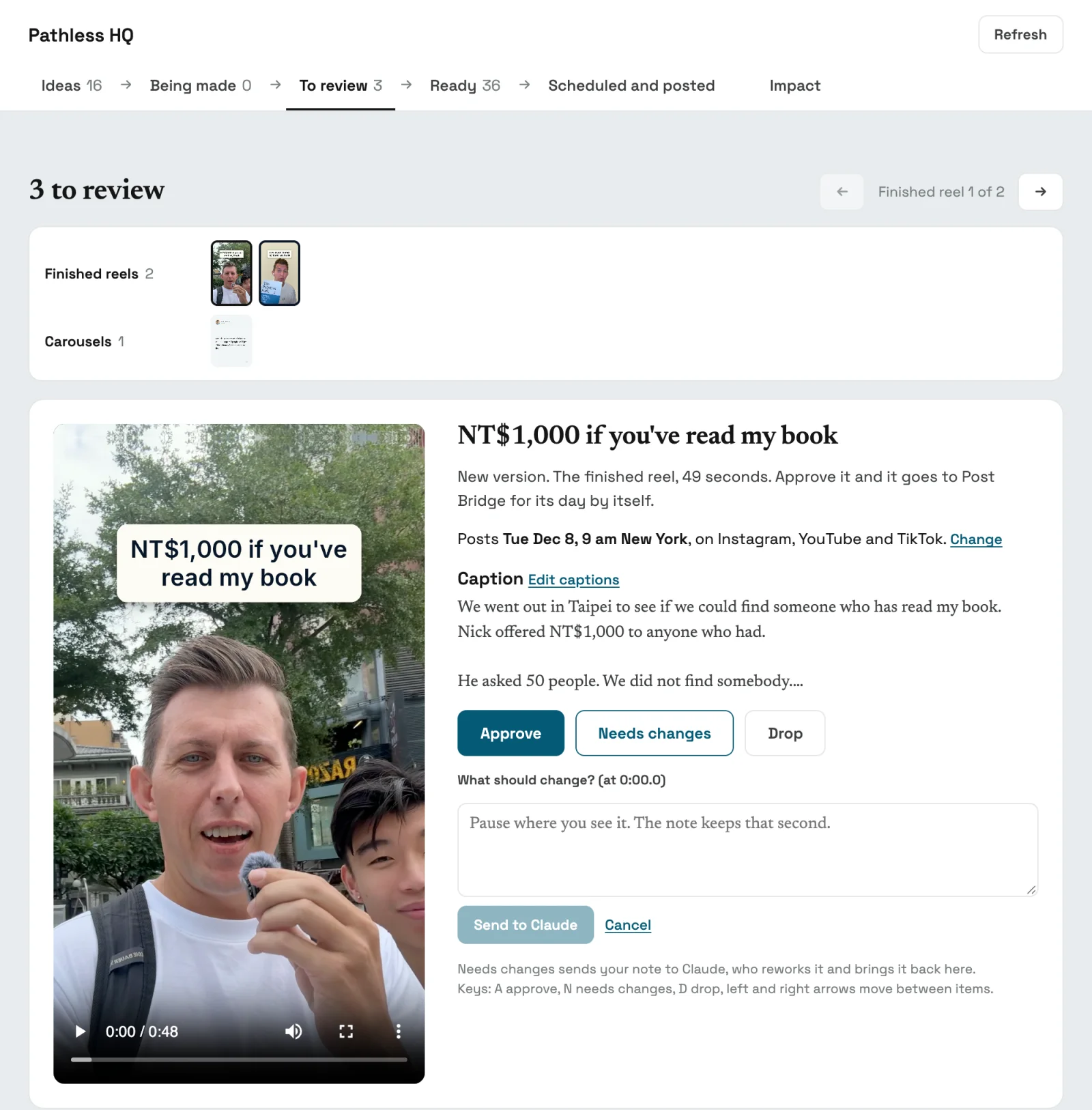
I approve each reel twice, once as a script before anything gets built and again as a finished video. Once I approve the finished video it gets scheduled automatically in Post Bridge for the next open day, with a caption written for each platform that I can still edit.
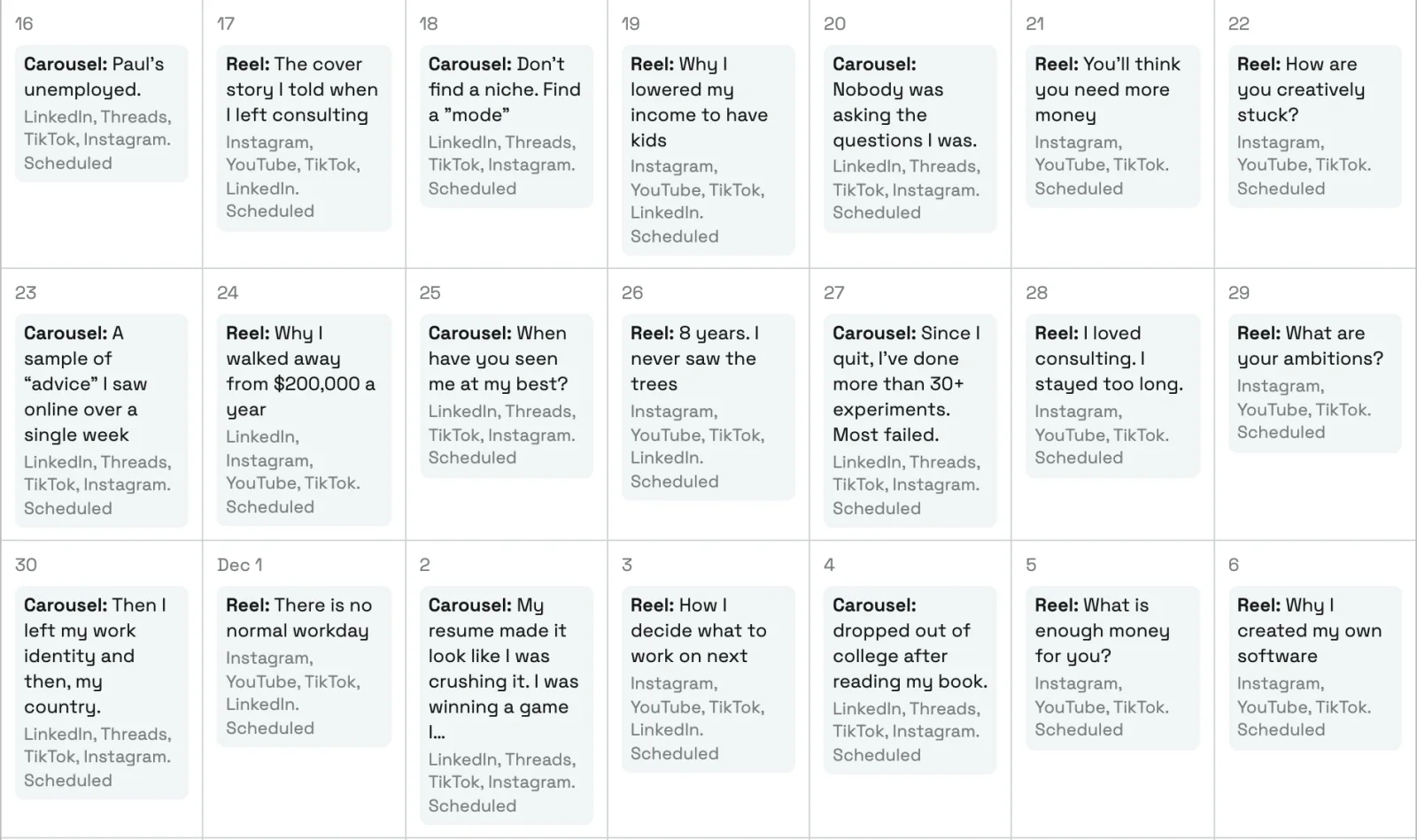
Links don’t work in Instagram captions, so those captions include a word to comment, like HARDCOVER, and my auto-reply tool sends the link by DM to anyone who comments it. I put a starter version of that tool on GitHub.
For now I post my long YouTube videos manually, like the 30-minute interview with William.
Claude builds useful libraries as you go
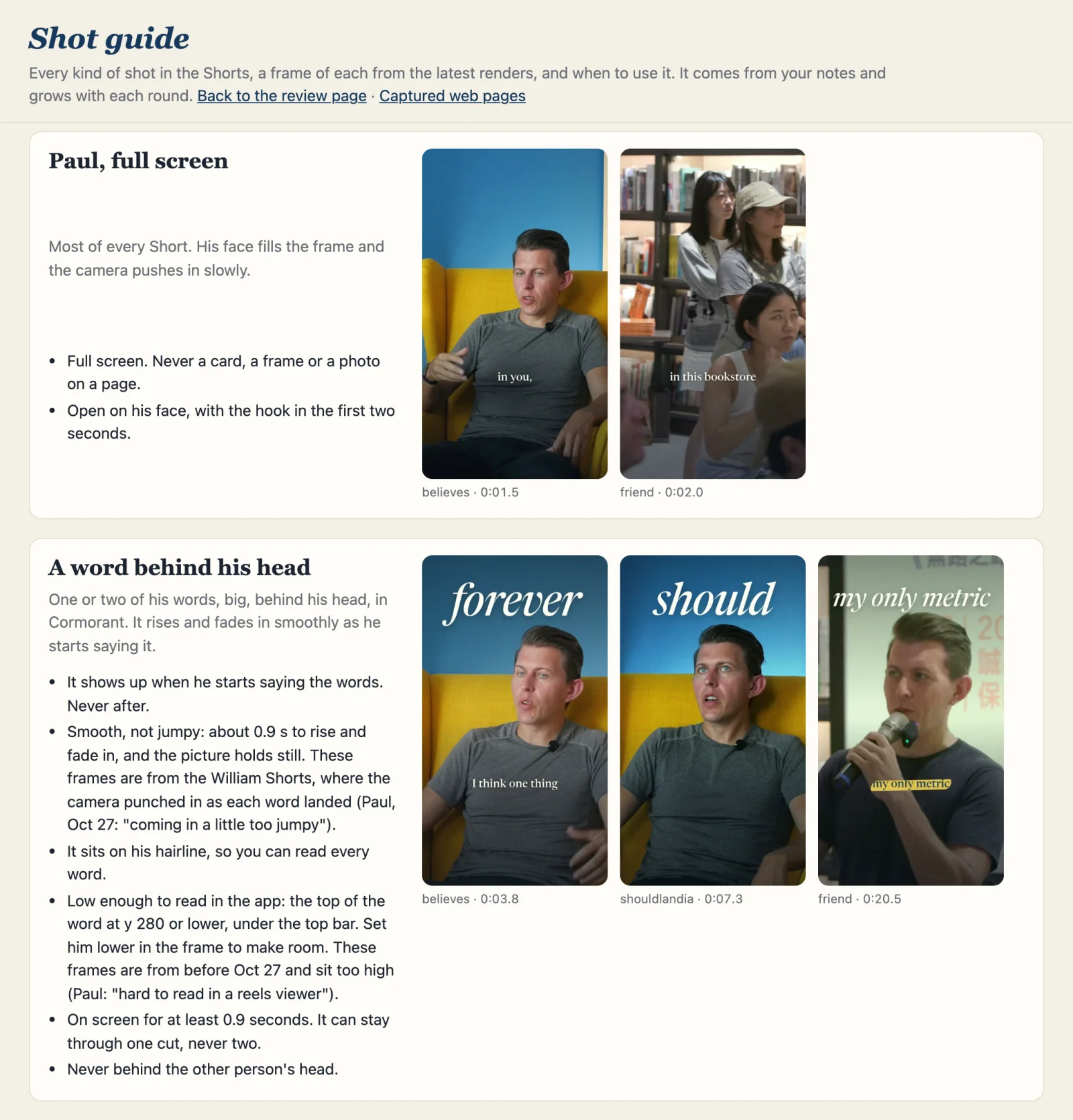
I have it building a shot library based on my preferences as I go, and also what I don’t like, and I have it proactively building a b-roll library. I can process multiple videos at once and have it updating and getting smarter each time. The skill that holds my notes works the same way. All three serve the same purpose, which is recursive improvement.
Claude picks from the shot library before it builds anything
It holds frames from finished Shorts and a few lines on when to use each kind of shot, plus a list of what I don’t want, like shaky zooms and outros. I also have it watch Instagram reels in the browser and show me stills, to see if I like them.
The b-roll library is the most exciting thing
It’s something I’ve meant to build for a long time. Anytime you talk to somebody who does video seriously, they say you should film and build out b-roll. Now that Claude can analyze, take screenshots, label, describe, and sort any video content I have, I’m way more motivated to actually film new stuff as well as go through old material.
I did a deep dive into hundreds of podcasts, past videos, and talks I’ve done, dumped it all in a folder, and told Claude to pull out all the interesting stuff. I then went through hundreds of clips and approved the ones that fit. It’s now searchable and something I can use to build out videos.
When a script is written, each line gets searched against the library, so a line about giving the book away pulls up the paperbacks I left on a bench in Barcelona.
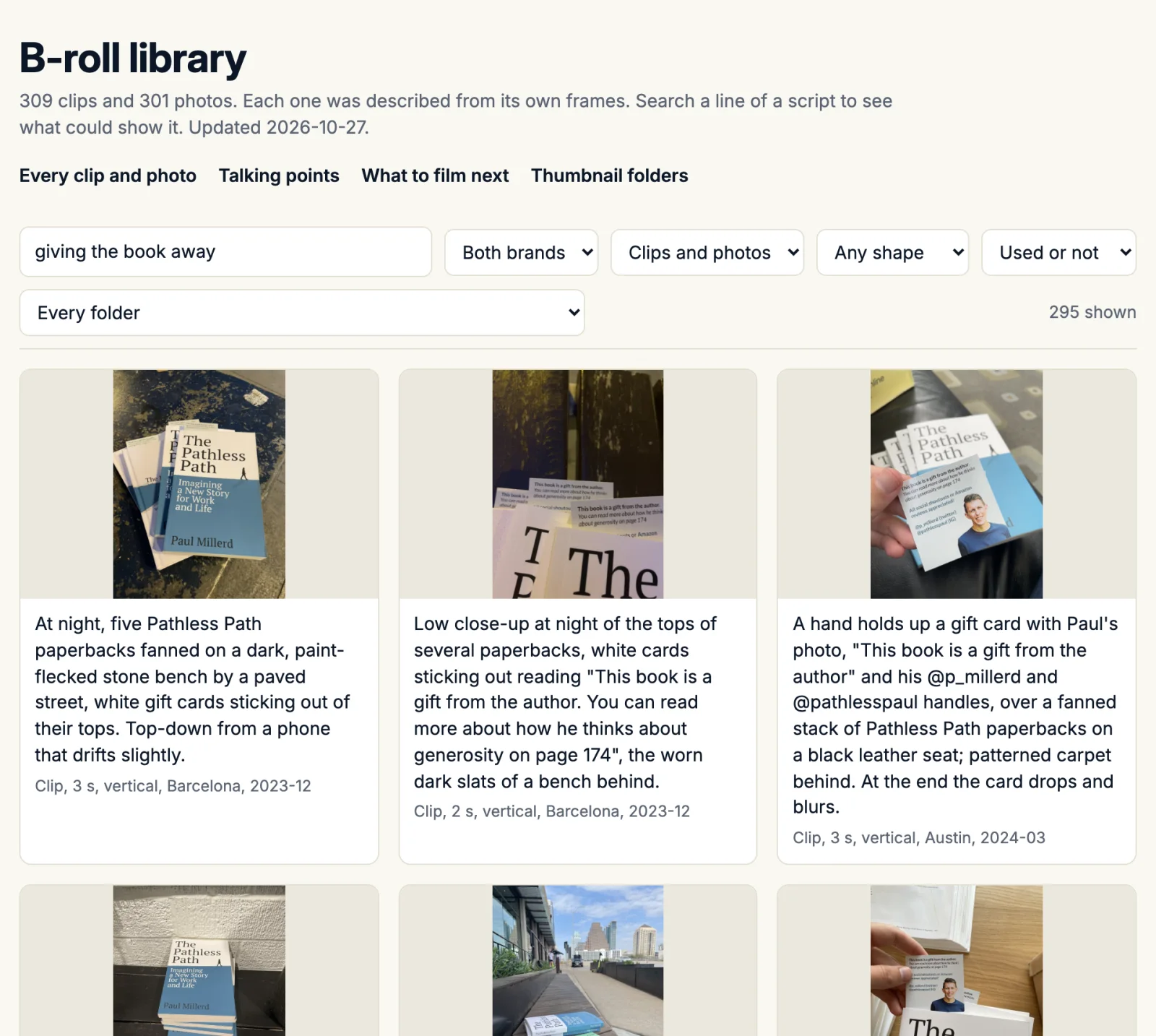
Claude labels each clip by looking at its frames, not its file name, which caught a photo labeled as me that was actually my wife, Angie. On one drive of 262 unedited podcast clips, it found the 29 where I do most of the talking by matching my voice. It has also cut 34 of my core ideas into short clips I can reuse.
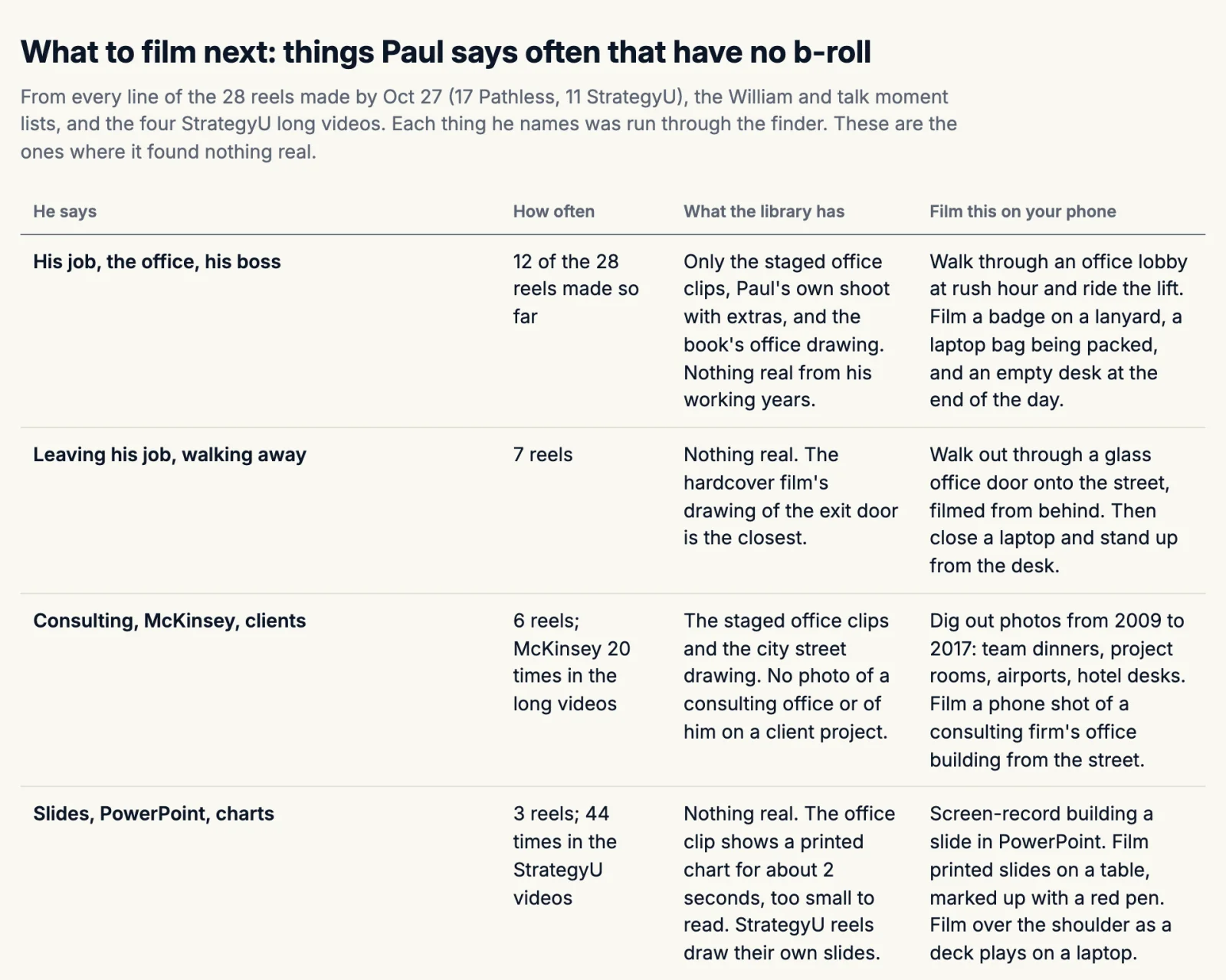
The library also has a list of what to film next, which is the stuff I talk about often but have no footage of. I bring up my old job in 12 of my first 28 reels and have nothing real from those years, so the list tells me to film things like walking out through an office door.
For free b-roll we’ve used Wikimedia Commons, the Internet Archive, and Pexels. A free music track from Pixabay did get a Content ID claim on YouTube, though.
Every time I fix something, it updates the skill
A skill in Claude Code is a set of instructions Claude reads before a certain kind of task, and mine for video is mostly made of my own notes. When a note is about a mistake, Claude also adds a check for it. A few of my notes and what each one turned into:
My note
What it turned into
"dont need outros on any of the clips i dont think"
No outros or end cards.
"you cut off words in 2 of them"
Claude checks the audio on both sides of every cut.
"weird cut here - it has captions that i dont say"
It transcribes the finished reel and compares every caption with what I said.
"youre blocking me head"
The opening text can't cover my face in any frame.
"why do you use the same 3-4 b roll in every reel"
Claude matches b-roll to each line from the whole library, and no clip repeats within a batch.
"this is not me"
It compares faces with my own footage before it uses a photo as me.
One day in October it ran eight renders at once and froze my Mac, so it now renders two at a time.
Review agents rate each video until it passes
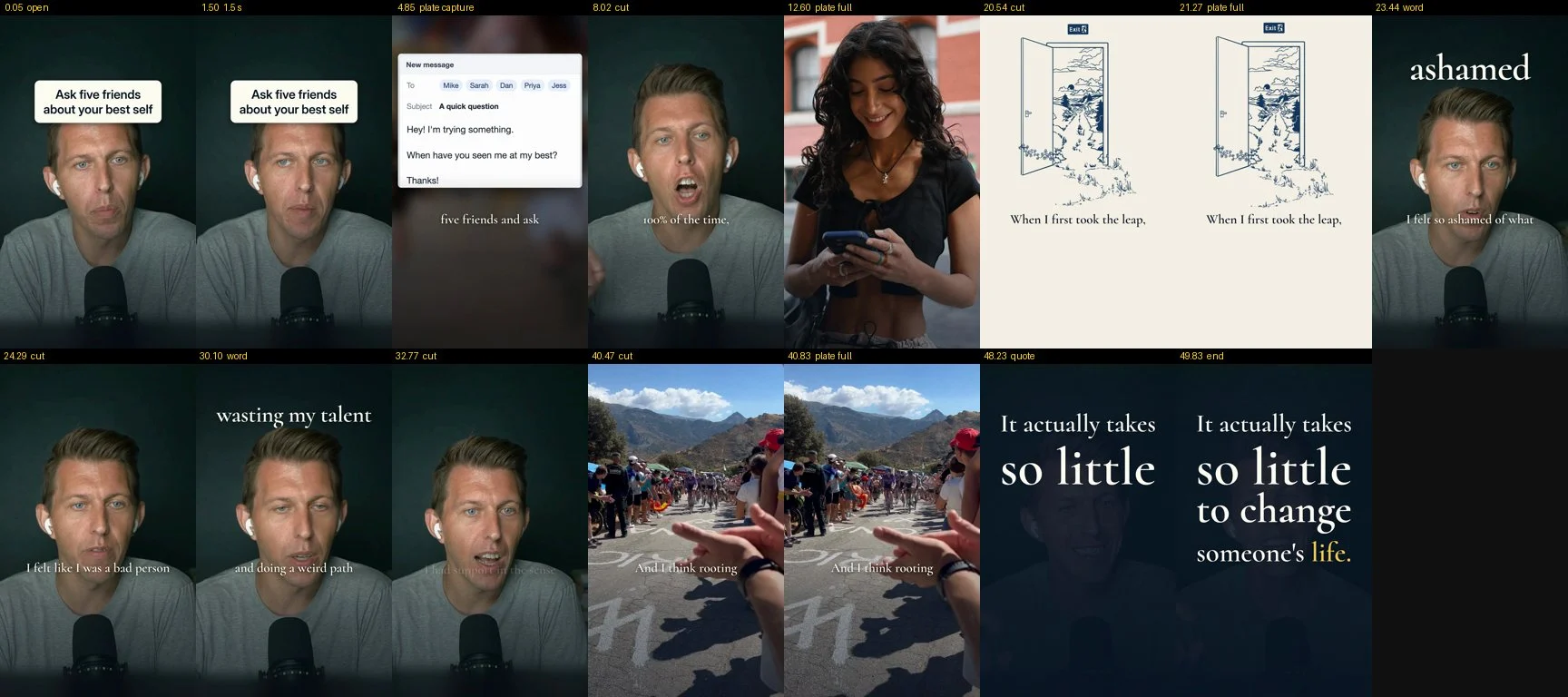
I’ve increasingly been having Claude direct other agents to review each video for sound, video, design, and style. They rate it, Claude fixes what they flag, and the video goes back to them.
A second review helped on a reel I’d watched on my phone, where I saw “so much blinking in my hand” even though every frame Claude had sampled looked fine. The agent, told to compare each frame with the one before it, found that the shading under the captions was switching on and off with each caption and changing the brightness of my hand and shirt.
Why I’m doing this
As soon as something is pretty capable, even with a little friction, it's something I want to experiment with, because I know that when models improve it will just get easier and more interesting.
It's almost better to experiment when things are a little rough, because you learn what works with the model. I think people struggle to know how to improve these things when the output is too polished on the first attempt.